


















当前页面提供中文版本。
切换到中文This page is available in English.
Switch to Englishこのページは日本語でも読めます。
日本語に切り替える 174 words
1 minute
Configure Docker + code-server on Alibaba Cloud to Build an Online IDE
Configure Docker + code-server on Alibaba Cloud to Create an Online Compiler
1. Install Docker
- Install Docker
Docker has two editions: Docker CE and Docker EE, namely the Community Edition and Enterprise Edition. This tutorial uses Docker CE.
- Install Docker dependencies and add the Docker software repository
yum install -y yum-utils device-mapper-persistent-data lvm2yum-config-manager --add-repo http://mirrors.aliyun.com/docker-ce/linux/centos/docker-ce.repo- Install Docker
yum makecache fast //更新yum缓存yum -y install docker-cedocker info //查看安装状态- Start the Docker service
systemctl start docker //启动docker服务systemctl status docker //查看docker状态systemctl enable docker //设置docker开机启动- Configure the Alibaba Cloud image registry (registry mirror)
- Go to the Alibaba Cloud image accelerator page
- Follow the documentation to complete the configuration
sudo mkdir -p /etc/dockersudo tee /etc/docker/daemon.json <<-'EOF'{ "registry-mirrors": ["https://0o9w7e5n.mirror.aliyuncs.com"]}EOFsudo systemctl daemon-reloadsudo systemctl restart docker- Reload after configuration
systemctl daemon-reload //重新加载服务配置文件systemctl restart docker //重启Docker服务- Install Nginx via Docker
- Obtain the latest Nginx image
docker search nginx //查看Nginx可用版本docker pull nginx:latest //拉取镜像docker images //查看本地镜像- Run Nginx
docker run --name nginx-test -p 8080:80 -d nginxVisit port 8080. If the Nginx service homepage appears, it is running correctly.
2. Install code-server
- Install code-server
curl -fOL https://github.com/cdr/code-server/releases/download/v4.4.0/code-server-4.4.0-amd64.rpmsudo rpm -i code-server-4.4.0-amd64.rpmsudo systemctl enable --now code-server@dreaife- Configure code-server
sudo systemctl enable --now code-server@dreaife //启动coder-server服务sudo vi ~/.config/code-server/config.yaml //修改配置文件sudo systemctl restart code-sercer@dreaife //重启code-server- Deploy code-server on 0.0.0.0
sudo vi ~/.config/code-server/config.yaml //修改配置文件sudo systemctl restart code-sercer@dreaife //重启code-serverfirewall-cmd --zone=public --add-port=7777/tcp --permanent //开放端口After installation is complete, open the code-server interface.
3. Configure the code-server Compilation Environment
- Install the C/C++ extension for code-server via VSIX
- Configure the required files in .vscode
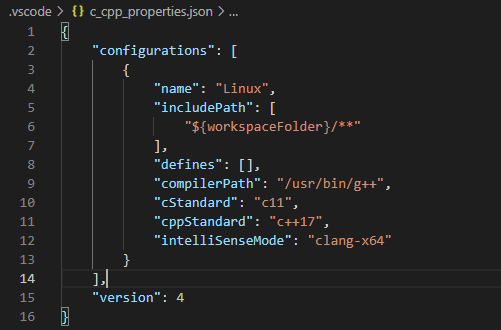
- c_cpp_properties.json file
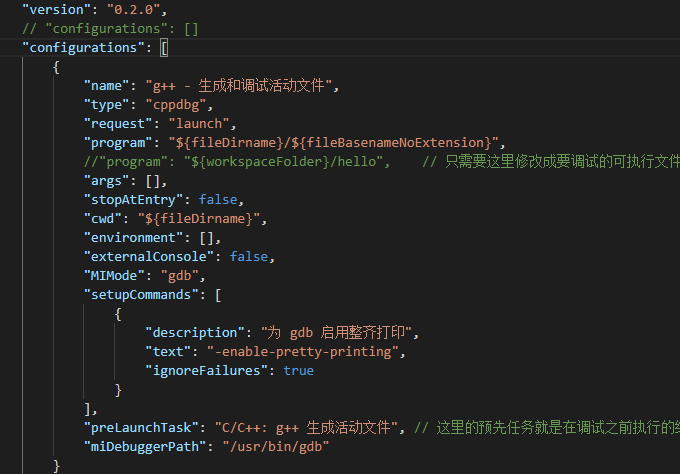
- launch.json file
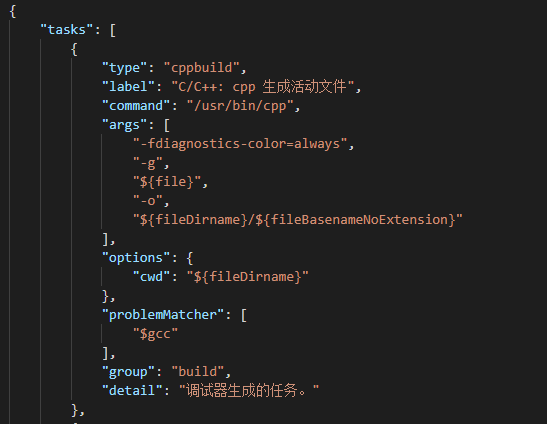
- tasks.json
- Test the installation
- Create a test.cpp file for testing
#include<iostream>#include<algorithm>#include<string>using namespace std;typedef long long ll;const int N = 1e5+10;int n,a[N];string s;void solve(){ cout<<"hello"<<endl;}int main(){ int _;cin>>_; while(_--) solve(); return 0;}- Run the test
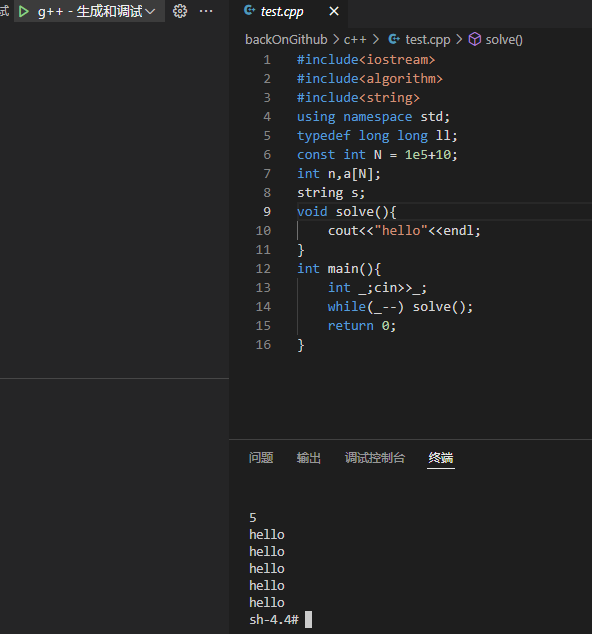
The program ran successfully and produced the correct result. The online compiler configuration is complete.
Share
If this article helped you, please share it with others!
Configure Docker + code-server on Alibaba Cloud to Build an Online IDE
https://dreaife.tokyo/en/posts/alicloud-docker-coder/ Some information may be outdated
Related Posts Smart
1
Forwarding Network Traffic to a Router via NAT on Ubuntu
Troubleshooting Share an Ubuntu host network with a router by configuring Netplan, static IP, IP forwarding, DHCP, and NAT rules, then verify client connectivity.
2
Installing Oh My Zsh and Its Plugins on Ubuntu
Troubleshooting Install and configure Oh My Zsh on Ubuntu with Zsh, Git, Powerlevel10k, useful plugins, and .zshrc settings for a productive terminal.
3
Errors When Using pandas.to_datetime with Different Date and Time Formats
Troubleshooting Fix pandas.to_datetime errors from mixed date strings with format="mixed", plus a concise example converting inconsistent values to datetime.
4
CSAPP Chapter 1: A Tour of Computer Systems
Study CSAPP Chapter 1 notes tracing a program from bits and compilation through CPU execution, caches, OS abstractions, processes, and virtual memory.
5
Missing Semester — Class 01
Study Missing Semester shell notes on commands, paths, permissions, pipes, I/O redirection, root privileges, Bash examples, and exercises.
Random Posts Random
1
My Online Scam Experience 01 — Scam Analysis
Notes 2024-08-19
2
CSAPP Chapter 1: A Tour of Computer Systems
Study 2023-01-15
3
Manually Completing an EVM Transaction in the Browser
Exploration 2026-09-13
4
Automatically Deploy an Angular Page with GitHub Actions
Troubleshooting 2024-11-04
5
Python Web Scraping Environment Setup
Troubleshooting 2024-01-01